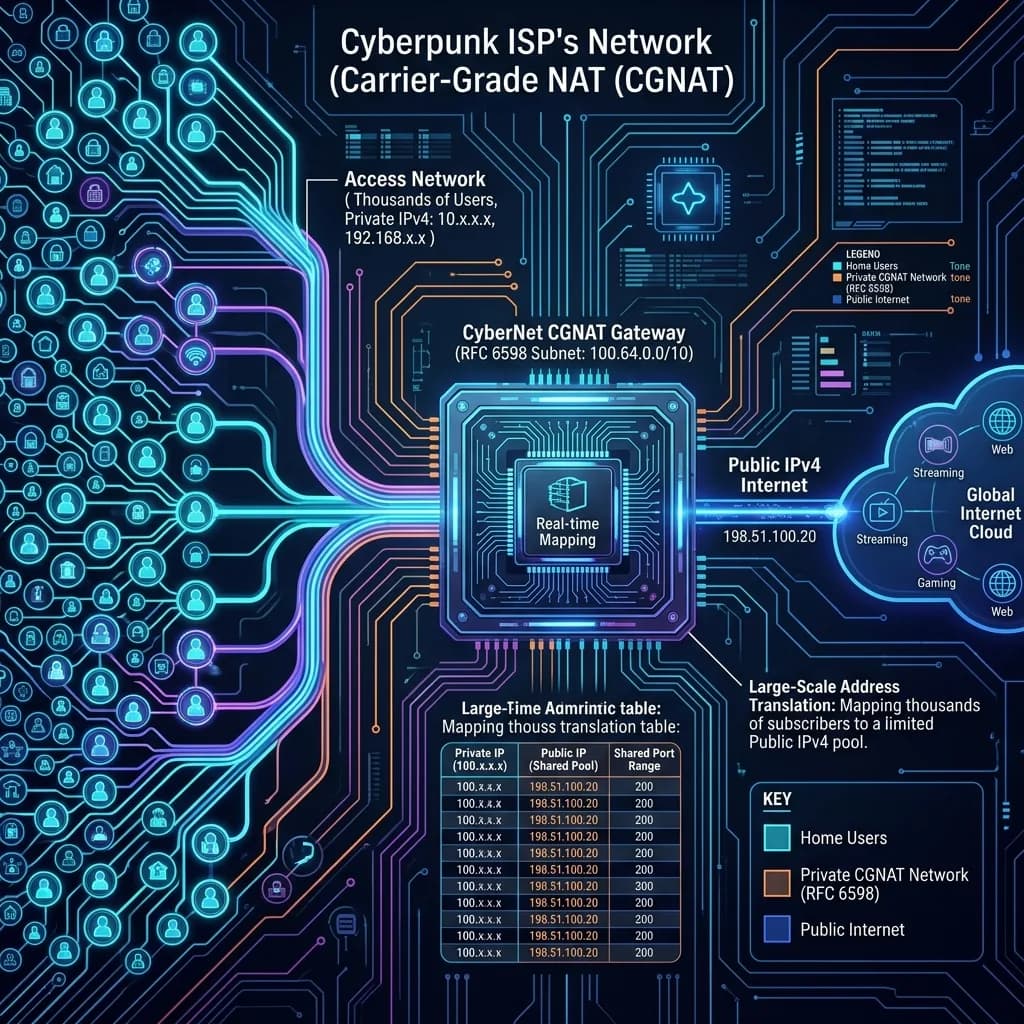
Short answer: if the WAN address in your router's status page starts with 100.64. through 100.127., and does not match the address our IP lookup tool reports, you are behind carrier-grade NAT. Port forwarding cannot work in that state, and no router setting will fix it — the fix is upstream.
Why your ISP did this
IPv4 has roughly 4.3 billion addresses. The regional registries ran out of unallocated blocks between 2011 and 2019, and there is no more supply — only a resale market where a single address trades for tens of dollars. An ISP adding a hundred thousand subscribers cannot buy a hundred thousand addresses at that price.
Carrier-grade NAT is the answer they landed on. Instead of giving every household a public address, the ISP hands out an address from the shared range 100.64.0.0/10 — reserved by RFC 6598 precisely for this — and translates traffic at a central device on the way out. Hundreds of homes leave the network wearing the same public address, distinguished only by port number.
It is, in effect, a second layer of the same NAT your own router already performs. Your devices sit behind your router's private network, and your router sits behind the carrier's. Hence the common name: double NAT.
Confirming it in 60 seconds
- Open your router's admin page and find the WAN or Internet status. Note the IPv4 address it reports.
- Open our IP checker in a browser on the same network. Note the public address it reports.
- Compare them.
If they match, you have a real public address and CGNAT is not your problem. If the router shows something in 100.64.x.x–100.127.x.x while the checker shows something entirely different, that gap is the carrier's NAT device.
Two variations worth knowing. A router showing 192.168.x.x or 10.x.x.x on its WAN port usually means an upstream modem is running in router mode rather than bridge mode — that is double NAT inside your own home, and you can fix that yourself by switching the modem to bridge. And an address in 10.x.x.x on the WAN can also be carrier NAT, since some ISPs use RFC 1918 space instead of the RFC 6598 range.
What actually breaks
Ordinary browsing, streaming and social apps are unaffected — they all start with an outbound connection, and NAT handles outbound fine. What breaks is anything that requires the outside world to initiate a connection to you:
- Hosting a game server. Minecraft, Rust, Valheim, FiveM, a Palworld dedicated server — friends cannot reach you, because there is no port to forward.
- Self-hosting anything. Home Assistant, Plex remote access, a NAS, a personal web server, a Git remote.
- Remote desktop and SSH into your home machine.
- Some peer-to-peer and console networking. Consoles often report Strict or Type 3 NAT, which degrades matchmaking and party chat in games that expect direct connections.
- Torrenting in seed mode. You can download, but incoming peer connections do not reach you, so your ratio suffers.
UPnP and NAT-PMP will not save you. Those protocols ask your own router to open a port, and your own router obliges — but the carrier's NAT upstream never hears the request and forwards nothing.
The four ways out, honestly compared
1. Ask your ISP for a public IPv4 address
The most direct route, and more often available than people assume. Many providers will move you off CGNAT on request, sometimes free, sometimes as a small monthly line item, sometimes only on a business plan. Ask specifically for "a public, routable IPv4 address, not CGNAT" — front-line support frequently does not recognise the term and will otherwise talk you through resetting your router.
Best when: you want everything to work normally with zero ongoing complexity. Watch for: some ISPs only offer it bundled with a static IP at a real price.
2. Use IPv6
CGNAT exists because IPv4 addresses are scarce. IPv6 addresses are not, so ISPs deploying IPv6 give every subscriber a routable prefix with no NAT at all. If your provider supports it, your services are directly reachable over IPv6 today.
Best when: the people connecting to you also have IPv6. Watch for: the gap in coverage is the whole problem — a friend on an IPv4-only connection still cannot reach your IPv6 address, and you must open the relevant ports in your router's IPv6 firewall, which is a separate ruleset from IPv4 port forwarding.
3. A tunnel or mesh VPN
Tools like Tailscale, ZeroTier and WireGuard build an encrypted overlay network between your devices. Because both ends make outbound connections to a coordination server, NAT on either side stops mattering. For remote access to your own machines, this is usually the correct answer — it is free at personal scale, takes about ten minutes, and is more secure than exposing a port to the internet.
Best when: you need to reach your own devices, or share a service with a handful of specific people who can install a client. Watch for: it does not work for a public game server where strangers must connect without installing anything.
4. A rented VPS as a reverse proxy
Rent the cheapest virtual server with a public address, run a tunnel from your home machine up to it, and let the VPS forward incoming traffic back down. Cloudflare Tunnel does this for web services at no cost; a plain WireGuard tunnel plus nftables forwarding does it for arbitrary TCP and UDP ports, game servers included.
Best when: you must be publicly reachable and your ISP will not budge. Watch for: every packet now takes a detour through the VPS, so pick a location near you and expect to add latency. For a game server, the VPS uplink also becomes your bandwidth ceiling.
The side effects nobody mentions
Sharing an address with hundreds of strangers has consequences beyond port forwarding.
You inherit their reputation. If someone on your shared address is scraping, spamming or attacking, the block gets flagged. That is why CGNAT subscribers see far more CAPTCHAs, more "unusual traffic" interstitials, and occasional outright blocks from sites that rate-limit by IP.
Geolocation gets worse. The address belongs to the carrier's NAT device, which may sit in a different city than you. If a site keeps insisting you are somewhere you are not, this is often why — see our guide on what an IP can and cannot reveal about your location.
Privacy, accidentally. The one upside. An address shared by a thousand subscribers is a poor identifier, and anyone who logs it — including the IP grabbers we cover here — learns much less about you than they would from a dedicated residential address.
Frequently asked
Will a VPN fix port forwarding? Only a VPN provider that explicitly sells port forwarding on a dedicated address. A standard consumer VPN puts you behind their NAT, which is the same problem with a different owner.
Does a new router help? No. The restriction is on the carrier's equipment. No consumer router setting reaches it.
Is CGNAT why my console shows Strict NAT? Frequently, yes. Enabling UPnP is worth trying first, since it fixes the ordinary in-home case, but if you are behind carrier NAT it will not change the result.
Can I detect it without router access? Compare the address your router reports with the one our checker reports. If you cannot reach the router at all, a traceroute showing a private hop immediately after your gateway is a strong signal — see our guide to reading a route.