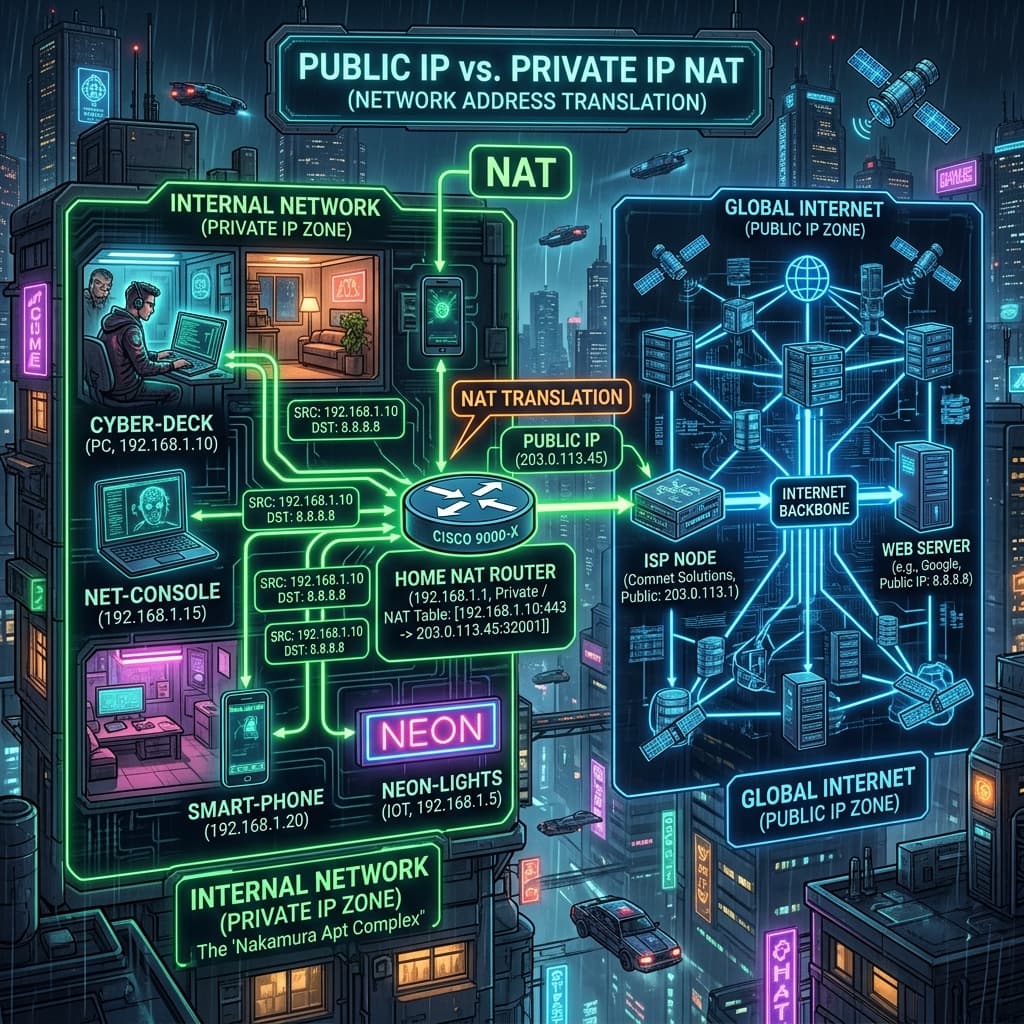
What is a Public IP Address?
Your Public IP Address is the globally unique numerical address assigned to your internet connection by your Internet Service Provider (ISP). It functions as your digital return address on the open web. Every website, server, or online service you visit receives this public address so it knows where to return requested web pages and data packets.
Because there are only about 4.3 billion IPv4 addresses available worldwide, public IP addresses are a finite resource. ISPs assign dynamic public IPs that change periodically when your router restarts, or static public IPs reserved for businesses and web hosting infrastructure.
What is a Private IP Address?
A Private IP Address is an internal network address assigned by your local router to devices within your home or office Local Area Network (LAN). Devices such as smartphones, laptops, smart TVs, and wireless printers each receive a unique private IP address from the router via DHCP (Dynamic Host Configuration Protocol).
Private IP addresses exist solely inside your local network and are completely unroutable on the public internet. This means a server in Tokyo cannot directly initiate a connection to your laptop's private IP (`192.168.1.15`).
Reserved Private IP Ranges (RFC 1918 Standard)
Under the Internet Engineering Task Force (IETF) RFC 1918 specification, three specific blocks of IPv4 address space are reserved exclusively for private local networks:
- Class A Private Range: `10.0.0.0` to `10.255.255.255` (Provides up to 16.7 million private host addresses; used by large enterprise networks).
- Class B Private Range: `172.16.0.0` to `172.31.255.255` (Provides over 1 million addresses; common in corporate subnets).
- Class C Private Range: `192.168.0.0` to `192.168.255.255` (Provides 65,536 addresses; used by almost all residential home routers).
How NAT (Network Address Translation) Bridges the Gap
How do ten devices in your home simultaneously browse the web using only one public IP address? The secret is Network Address Translation (NAT) built into your router.
When your smartphone requests a web page, the router intercepts the packet, replaces the smartphone's private IP (`192.168.1.50`) with the router's single public IP (`203.0.113.42`), records the transaction in an internal NAT state table, and sends the request out to the internet. When the web server replies, the router looks up the port mapping in its NAT table and routes the response back to your smartphone.
Public vs Private IP Comparison
| Attribute | Public IP Address | Private IP Address |
|---|---|---|
| Scope | Global Internet (WAN) | Local Network Only (LAN) |
| Uniqueness | Must be unique globally across the web | Unique only within the local network |
| Assignment | Assigned by ISP (Comcast, Starlink, etc.) | Assigned by local router DHCP |
| Example Format | `203.0.113.42` | `192.168.1.1` or `10.0.0.5` |
Security Implications of Public vs Private IPs
Your private IP address poses zero security risk on the internet because external websites cannot reach it directly. However, your public IP address reveals your approximate city, ISP, and ASN route to every website you visit. If you want to mask your public IP address, using a reputable VPN or proxy shields your real location behind an encrypted server address.
Check what your public IP address and ISP reveal about you right now using our free IP address lookup tool.